QR Inventory helps commercial trade contractors (HVAC, plumbing, electrical, roofing, solar) track material receiving and usage by project in real time and reconcile actual inventory activity with approved project requirements.
Use the dynamic construction material tracking Excel template to maintain the original takeoff, log changes and revisions, auto-create current requirements list, then import QR Inventory data into the workbook to compare planned material requirements with actual inventory activity. QR Inventory data can be refreshed automatically using Excel Power Query and a QR Inventory API endpoint.
With QR Inventory, you can do more than track where project materials are and how they move. You can also connect inventory data with the current project material requirements list to compare what the project needs with what has actually been received, used, returned, and what remains available.
Who is it for? Commercial trade contractors - HVAC, plumbing, electrical, utilities, solar, roofing and other contractors managing material-intensive jobs.
What does QR Inventory track? QR Inventory tracks everything that happens to inventory - materials, parts, supplies - by job or project: what was received, where it was stored, when it was delivered to the job site, used or returned to warehouse.
Where do project requirements come from? Currently, the original takeoff, change order records, and the auto-generated current requirements list are maintained in the construction material Excel spreadsheet that can be linked to QR Inventory via API.
What gets reconciled? Current required material quantities are compared with actual inventory activity to identify waste, shortages, excess usage and other discrepancies.
What is the benefit? A planned vs. actual view of project materials that helps contractors make better purchasing decisions, catch discrepancies earlier and keep inventory aligned with changing project requirements.
A link between the original takeoff, material changes, and real-time inventory data solves one of the problems in commercial construction - the disconnect between the original estimate (takeoff), change orders and real-world field inventory.
A takeoff list reflects what the job was expected to require when the bid was prepared. Once work begins, quantities change, materials are added or removed, substitutions are approved, and actual purchase prices may differ from the original estimate. Two problems commonly follow.

By bringing project takeoff, approved material changes and inventory tracking in one system you can manage full material lifecycle - from the original estimate and approved changes to current requirements and actual field usage.
Follow project materials from the original estimate through approved changes, current requirements, and real-world inventory activity - then reconcile quantities and prices to guide purchasing and catch discrepancies early.

Preserve the original project material list, quantities and estimated costs as the baseline. This keeps the bid-time estimate intact instead of overwriting it as the project scope changes.

Log material requirements changes as the project progresses: quantity increases and decreases, additions, removals, substitutions and cost changes separately from the original takeoff. Approved changes become part of the current project requirements, while the original baseline remains unchanged.
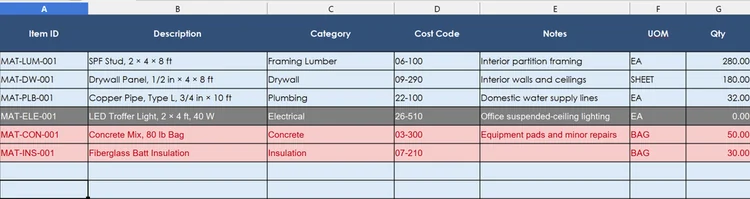
The construction material spreadsheet applies approved changes to the original takeoff and automatically produces an up-to-date list of current material requirements, including revised quantities and costs.
Track inventory in real time, on job sites and in warehouses, with a field-optimized mobile app that supports natural language voice control and bulk QR code scanning - to make inventory tracking fast and simple for field and warehouse employees. That data can be automatically imported into the Excel workbook using Power Query and a QR Inventory API endpoint - for planned vs actual comparison and material variance tracking.

Compare current required quantities with actual inventory activity to see what still needs to be purchased, where quantities exceed requirements, whether usage is running ahead of plan, and where material or cost discrepancies need attention.
The result: A continuous material variance workflow: original estimate → approved changes → current requirements → actual inventory → purchasing and discrepancy decisions.
Connecting current project material requirements with real-time inventory activity gives you the answers to these questions:
The result is more than a record of what changed or what is currently in inventory. It provides an operational planned-vs.-actual view that helps contractors decide what to buy next, where inventory does not match current project needs, and which discrepancies require attention.
Commercial trade contractors often manage material-intensive projects where project material requirements continue to change after the original takeoff is completed, while material purchasing, receiving and usage continue in parallel. The more materials, field locations, crews and revisions are involved, the harder it becomes to keep current project needs aligned with what is actually happening with inventory.
Connecting project material management with real-time inventory tracking is especially useful for trade contractors working on commercial construction projects: HVAC, plumbing, electrical, utilities, solar, roofing, and other specialty trades. These contractors submit the bid, then purchase and stage materials over time, and need to align inventory purchases and usage with changing project scope.
For contractors managing substantial material requirements across changing projects, connecting current requirements with actual inventory activity turns two separate records into a practical tool for purchasing, field control and project cost management.
