> Real-Time Inventory Workflow
How Real-Time Inventory Management Software Works - QR Inventory Workflow
QR Inventory software streamlines your operations with
mobile inventory tracking,
bulk QR code scanning, and instant cloud updates.
You get real-time asset and inventory visibility across field and warehouse locations, without manual notes and work distractions.
AI-powered natural language tools and mobile voice control help you deploy the system fast,
simplify daily software use for company employees, and achieve higher software adopton with minimal training.
QR Inventory Process
Real-Time Inventory & Asset Management Workflow
QR Inventory software adapts to your business workflow by letting you customize key aspects of your inventory management process:
transaction types, workflow steps, data fields, dashboards and reports.
Step 1. Define Your Asset & Inventory Structure
Configure the QR Inventory cloud system based on your specific business tracking requirements.
- Add tracking locations: warehouses, job sites, service trucks, shops, and yards - all points where you transfer, store, and use inventory or mobile assets.
- Create custom inventory transactions: receive inventory, check out tools, deliver to a job site, use for a project, or manage sales, rentals, and leases.
- Define custom transaction data to collect, for example PO numbers, vendors, job numbers, digital signatures, and photos.
- Define what data you want to keep in the system for assets and inventory, such as manufacturer, specs, size, certifications, etc., etc. Upload images and / or pdf documents if applicable.
- Set up automated alerts on low stock, expiration dates, warranty renewals, preventive maintenance, and more.
- Enter or import your data into the system: assets & inventory list, initial stock count, and locations. If you do not have lists, use QR Inventory mobile app to scan labeled items
and enter them into the system, updating items list and count in one step.
Step 2. Generate & Print QR Code Labels For Assets & Inventory
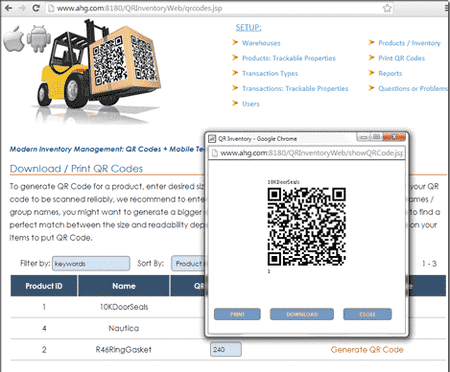
Generate, lay out, and print QR code labels using built-in QR code generation, layout and printing tools.
- Generate QR code labels for error-free asset and inventory identification and tracking.
- Print QR code labels on-demand, individually, or in bulk batches.
- Generate print-ready PDFs optimized for standard office printers - no specialized equipment required.
- Customize dimensions, layouts, and font sizes to match your blank labels.
Step 3. Mobile Inventory Tracking with Bulk QR Code Scanning & Voice AI
Fast, simple, and efficient mobile asset tracking across the field, warehouse, service trucks, or shop floor.
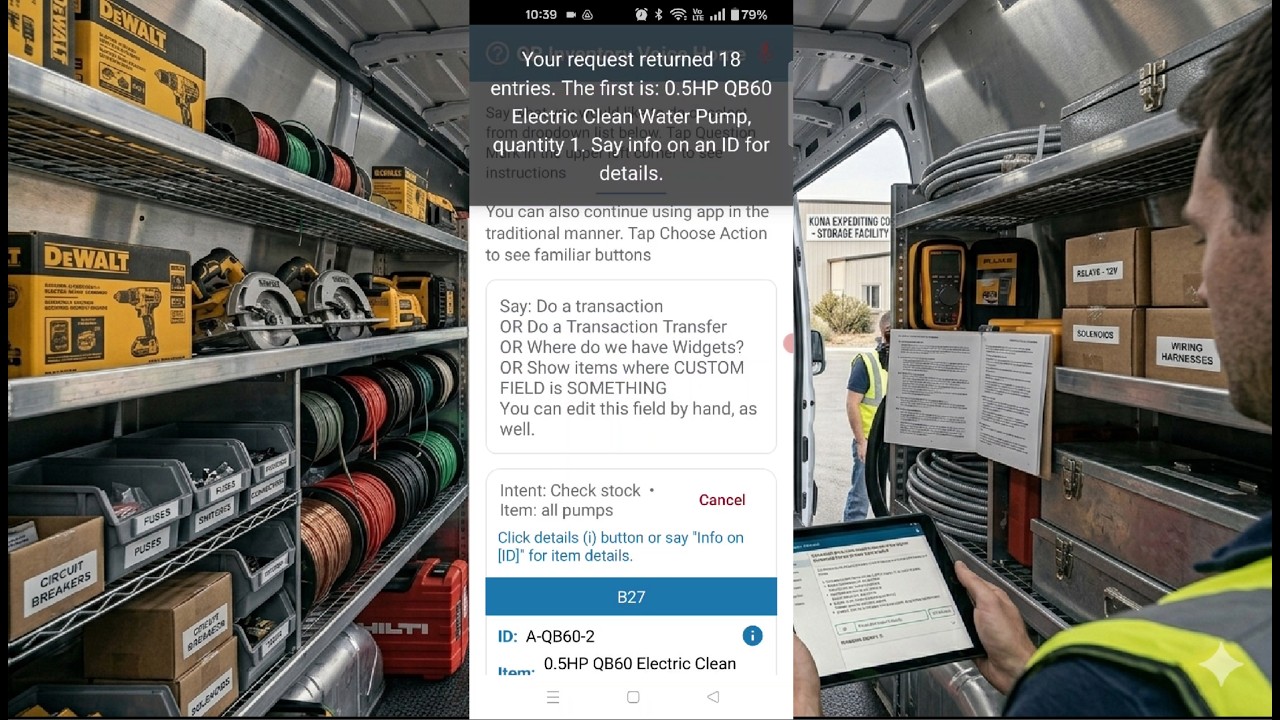
- Record inventory updates in seconds using a field-optimized mobile app powered by natural language voice AI.
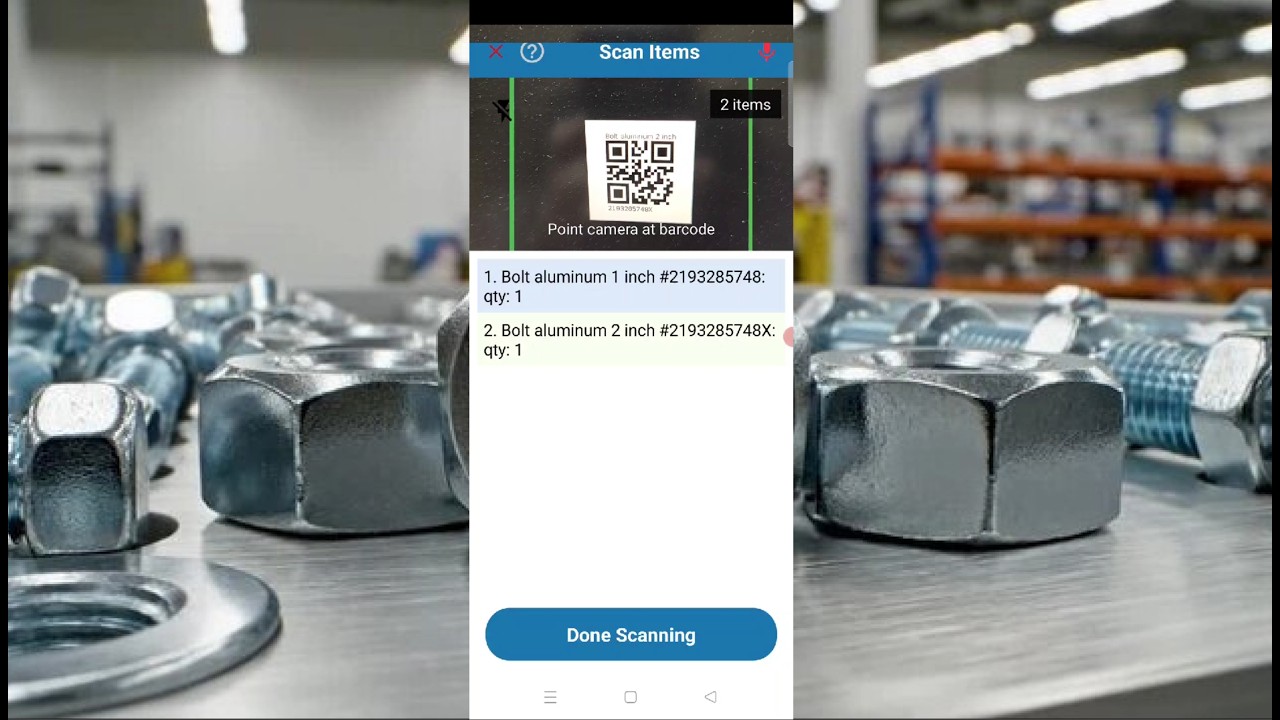
- Process inventory transactions faster using continuous, high-speed bulk QR code scanning on mobile devices.
- Collect critical on-site info: job numbers, asset conditions, signatures, and photos in the mobile app for well-organized documentation.
- A mobile app automatically logs GPS location of the transaction, date, time, and employee ID, reducing data entry requirements.
- Use voice control commands to check real-time stock levels, locate equipment, or open asset documentation in the field instantly, without menu clicking.
Step 4. Automated Real-Time Cloud Sync
A cloud database acts as a central hub, instantly receiving remote updates to deliver real-time data across the organization without delay.
- Sync field transactions from mobile tracking apps to the secure, centralized cloud inventory system in real time.
- Provide office and field teams with unified, real-time asset visibility across all warehouses, service trucks, and remote job sites.
- Bridge the field-to-office gap with zero-lag data flow to support faster, more accurate operational decisions.
Step 5. Access Real-Time Inventory Reports & Cloud Dashboards
Make data-driven purchasing and operational decisions with dynamic tracking analytics.
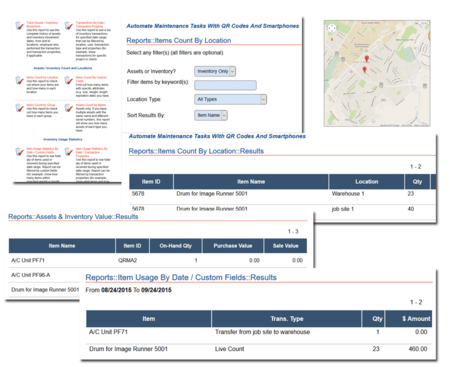
- Monitor current stock levels, tool conditions, and materials utilization across warehouse and field locations via a live web dashboard.
- Review comprehensive transaction histories searchable by item, user, field location, or date range.
- Maintain complete asset accountability using tool check-out/check-in logs complete with asset conditions checklists, signatures and photos.
- Track historic asset locations and deployment durations for accurate job site billing and equipment utilization reporting.
- Analyze inventory level fluctuations to build smarter, automated purchasing plans.
- Simplify data analysis using natural language reporting tools to query your data in plain English without complex filters.
- Export cloud data easily to standard CSV formats for quick integration with external ERP or accounting software.
Automated Asset Tracking With BLE Tags & IoT Gateways
Monitor assets and equipment in real time 24/7 without relying on company employees and manual scans.
- Use
BLE (Bluetooth Low Energy) tags
to track equipment and inventory automatically, without human input.
- Deploy
Bluetooth IoT gateways
to detect nearby tagged assets and report their location in real time.
- Monitor asset presence, movement, and dwell time across job sites, warehouses, or vehicles.
- Eliminate missed scans and human error with continuous, passive tracking.
- View asset locations, movement logs, and history through a centralized cloud dashboard.
- Receive instant alerts on misplaced or missing assets using geofencing.
QR Inventory's AI / NLP tools do not replace human support, but supplement it.
If you prefer to talk to a human, our technical support responses are fast and effective - we do not give you run-arounds or make you wait for days for an answer or
a solution to your problem.
QR Inventory Smart Tech Summary
Smart Technologies Behind Real-Time Inventory Management: QR Inventory Advantage
QR Inventory is built on a foundation of smart technologies designed to give businesses
real-time inventory and asset visibility and control,
achieved through a simple and efficient workflow.
Mobile devices, cloud connectivity, BLE tags, and AI-powered natural language voice interfaces work together seamlessly to streamline operations in the field, warehouse, and office.
-
Mobile Devices: Turn smartphones and tablets into powerful inventory and asset tracking tools. Use them for mobile scanning, fast inventory updates, and real-time info
lookup anytime, anywhere.
-
Centralized Cloud Platform: Serves as your secure data hub, delivering real-time inventory data instantly to all authorized mobile app users
and office desktops.
-
QR Code & Barcode Scanning: Tag, organize, and track inventory with fast, accurate mobile scans - eliminating the need for expensive, proprietary hardware.
-
BLE & IoT Automation: Deploy Bluetooth Low Energy (BLE) tags and IoT gateways to enable a fully automated asset tracking system that monitors
tools and equipment 24/7 without manual input.
-
AI & Natural Language Processing (NLP): Leverage mobile voice interaction, natural language reporting, and intelligent data processing to
accelerate software deployment and automate daily inventory management tasks.
QR Inventory Advantage For Industries
Benefits of Real-Time Inventory Software For Field-Based Businesses
QR Inventory software works best for non-retail businesses requiring real-time tracking, management, and visibility of assets and materials across multiple field and warehouse locations.
1. Field-Based Services & Construction
QR Inventory helps field-based companies track materials, tools and equipment across multiple job sites, storage locations and service trucks in real time,
automate materials ordering and replenishment, improve purchase planning and equipment utilization.
-
Field Service Companies
— use QR Inventory to track consumables, parts, and specialized tools between warehouse, service trucks and technicians in real time.
-
Construction Companies
— use QR Inventory to monitor small equipment and heavy machinery deployments, tool check-outs, and building materials across active job sites.
-
HVAC and Plumbing Contractors
— use QR Inventory to
manage service truck inventory stock,
track expensive diagnostic equipment, and log parts used on service calls.
-
Electrical Contractors
— use QR Inventory for tracking high-value wire reels, conduits, fixtures, and specialized testing tools from the warehouse to the field.
-
Landscape Companies
— use QR Inventory to monitor commercial mowers, power tools, nursery stock, and bulk materials distributed across warehouse, trucks and client sites.
-
Lumber Yards
— Use QR Inventory to manage lumber lifts delivery, yard location and use for production, track completed orders with quick mobile scans or
BLE tags and IoT gateways.
-
Oil & Gas Companies
— use QR Inventory for accurate custody tracking of high-value field assets in remote locations.
2. Manufacturing & Work-In-Progress (WIP) Tracking
QR Inventory helps manufacturers optimize shop floor operations with live work order tracking, BOM and assembly building management, and digital documentation.
-
Shop Floor Inventory Tracking
— With QR Inventory, manufacturers monitor raw materials, sub-assemblies, and finished goods on the shop floor in real time with the mobile app and QR code scanning.
-
Work-In-Progress Tracking
— WIP tracking in the QR Inventory software allows manufacturers to monitor multi-stage production cycles step-by-step, identify operational bottlenecks, log labor time,
and complete digital quality assurance forms.
-
Serialized Inventory Traceability
— With QR Inventory manufacturers can trace serialized inventory from receiving to use in production for quality control and regulatory compliance.
3. Laboratories & Research Facilities
With QR Inventory, labs can maintain precise internal custody logs, track samples through the process, and monitor equipment status.
-
Medical & Scientific Laboratories
— With QR Inventory labs can track sensitive biological samples, chemical reagents, and high-value lab equipment, maintain sample traceability and track
chain-of-custody with a verifiable digital audit trail.
QR Inventory vs Other Software
How QR Inventory Software Is Compared To Other Inventory Management Systems
QR Inventory vs Sortly |
QR Inventory is better suited for businesses that need customizable workflows, real-time tracking with choice
of tags (QR codes, barcodes, NFC, BLE)
and trackers (mobile phones, mobile computers, barcode scanners, IoT gateways), and flexible hosting options.
Sortly is a simpler visual inventory app ideal for small teams with basic tracking needs and minimal configuration.
|
|
|
QR Inventory vs EZOfficeInventory |
EZOfficeInventory excels at IT asset lifecycle management and maintenance scheduling,
while QR Inventory is better at tracking inventory, tools, and field assets with a customizable process and
multiple add-on capabilities.
|
|
|
QR Inventory vs GoCodes |
GoCodes focuses on QR code-based asset tracking with a pre-set process,
while QR Inventory offers more advanced tracking options, including automated asset tracking with IoT gateways,
with a flexible workflow that companies can adjust to their needs.
|
|
|
QR Inventory vs inFlow Inventory |
inFlow is strong for product-based businesses with sales, invoicing, and purchasing features,
while QR Inventory is ideal for field service and construction businesses needing real-time tracking, mobile scanning, and multi-location inventory control.
|
|
|
QR Inventory vs Asset Panda |
Asset Panda offers a broad asset tracking platform with configurable forms and IT-focused features,
while QR Inventory offers materials, tools and equipment tracking using various smart tags (QR, NFC, BLE) and modular structure
for additional functionality, from process tracking to mobile forms to BOM and assemblies building.
|
|
|
QR Inventory vs ToolWatch |
ToolWatch is designed for large-scale construction firms with deep integrations and BLE tracking,
but may require complex setup. QR Inventory provides a more agile, cost-effective alternative with QR and BLE support and easier mobile deployment.
|
|
|
QR Inventory vs Fishbowl |
Fishbowl is a robust inventory and manufacturing platform built for warehouse operations and ERP integration,
while QR Inventory offers a lightweight, mobile-first solution ideal for field use, real-time tracking, and customizable workflows without the overhead
of a complex system.
|
|
|
Ready To Automate Your Inventory Management Process? Here Are The Next Steps.
If you want to continue exploring
QR Inventory software on your own, we have plenty of options for you.
You can read more materials on this site, including a
brief summary of
QR Inventory features,
and how QR Inventory can
be applied to
different industries.
You can take
QR Inventory tour,
and request access to our
AI inventory chatbot to ask any questions
you have on QR Inventory system in natural language.
Finally, you can request
access to the
QR Inventory video demo,
and
take QR Inventory for a test drive.
If you would like to talk to us, discuss your project and next steps, and get a
quote -
please contact us. We will be happy to hear from you!