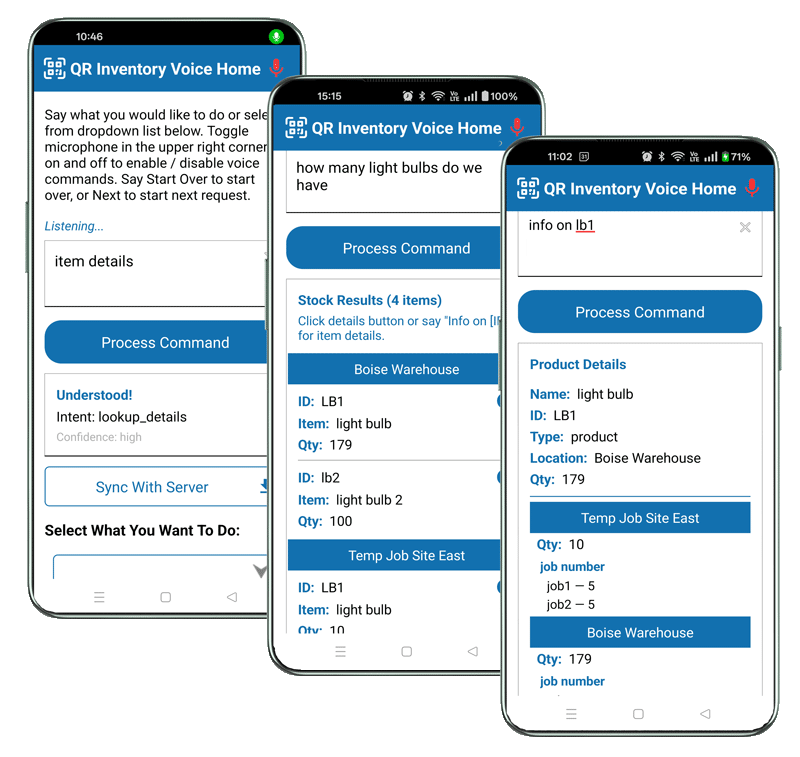
Voice App Overview
What You Get With AI-Powered Voice Inventory App
Voice-enabled inventory app lets field technicians, shop floor employees, and warehouse staff check stock, record transactions, and access inventory info using natural language
and standard mobile devices - increasing speed and efficiency.
Business Impact
- Faster Inventory Actions Check stock, record usage, and update items instantly using natural language voice commands.
- Hands-Free Workflow Access and update inventory without stopping work or putting tools down.
- Minimal Training Required Users interact with the app in plain language — no learning curve or complex menus.
- Improved Accuracy Combine voice input with QR code scanning to reduce manual entry errors.
Technical Readiness
- Hardware Works on standard iOS and Android smartphones or tablets.
- Audio Uses built-in microphones or Bluetooth headsets for hands-free operation.
- AI / NLP Built-in AI engine understands natural language commands.
- Cloud Integration Real-time sync with centralized cloud platform.
Voice App In Real Work Environments
How Voice Inventory App Increases Productivity & Simplifies Workflow
Field employees are often carrying materials, wearing gloves, running equipment, handling specimens - and they still need to log inventory transactions.
With QR Inventory mobile app they can do it by talking, without manual entries or touching the smartphone screen.
The voice recognition and AI engine run directly on the mobile device, so your employees keep working regardless of coverage.
Check Inventory Instantly Without Stopping Work
-
Hands stay on the job - no stopping to tap screen
A technician carrying tools asks, "How many 2-inch valves do we have?"
The mobile app interprets the command and instantly gets real-time info from the centralized cloud - there is no need to stop, search, or navigate screens.
See it in action
Record Material Usage While Working
-
Use it and log it at the same time
On a job site, materials are used and logged at the same time. A worker says,
"Inventory transaction - use for project", speaks location and job number, scans inventory items while staying on the same screen - no extra
taps or clicks for each scan, and submits the transaction.
Transaction is instantly synced to a central cloud database, updating stock levels in real time.
See it in action
Find Inventory & Assets Across Warehouses, Trucks, and Job Sites
-
Know where everything is — instantly
A worker asks, "Where do we have pumps?"
The system searches across all locations and returns accurate availability,
pulling data from the centralized cloud inventory platform.
See it in action
Combine Voice Commands with QR Code Scanning
-
Speak it. Scan it. Done.
Say "Do receive transaction to warehouse B27", then scan QR codes of all items to add them to the batch, and say "Done" when done scanning.
Say "Submit" to submit transaction to the cloud database.
Voice input and QR code scanning work together to complete transactions quickly and accurately.
See it in action
Continue Working Even Without Connectivity
-
Work without cell signal
Voice commands are processed on the device, and transaction is stored locally when offline.
Once a connection is available, updates are synced with the cloud system.
Stay Focused and Aware in Active Work Environments
-
Eyes up, not on the screen
Workers interact with inventory without looking down at a screen, staying aware of equipment, vehicles, and surroundings
while still accessing and updating inventory in real time.
Why Use QR Inventory Voice App
QR Inventory Voice-Enabled Mobile App At A Glance
Deploy App Instantly with No Training
The biggest barrier to adopting new technology is the time and cost of training. QR Inventory mobile app with voice AI Assistant removes this friction,
allowing employees to talk to the system in natural language instead of mastering complex interfaces.
- Become Productive On Day One Whether you are managing long-term field technicians or scaling up with seasonal and temporary employees,
your team can start tracking inventory immediately.
- If They Can Talk, They Can Use It If your employees can describe what they are doing in plain English, they are already trained.
- Improved Employee Adoption By removing technical hurdles, you ensure that even the most "tech-averse" workers can use the software without problems.
QR Inventory Voice App Highlights
-
QR Inventory Understands Natural Language
Employees can speak naturally to the application, and the system interprets intent using built-in AI and natural language processing.
-
The App Is Built for Hands-On Work Environments
QR Inventory voice mobile app is designed for field technicians, shop floor employees and warehouse staff, who are moving, carrying tools, or working under pressure —
giving them options to access data and process transactions with voice, scanning or screen taps.
-
Your On-Site Inventory AI Assistant
QR Inventory mobile app acts as an
AI assistant,
not just software - helping users retrieve information, complete transactions, and move through inventory management tasks
without interrupting their work.
-
Real-Time Inventory Updates
All inventory updates in multiple field and warehouse locations are synced to the centralized cloud system in real time,
ensuring accurate, up-to-date inventory records at all times.
-
Voice and QR Code Scanning Work Together
In QR Inventory mobile app you can combine spoken commands with QR code or barcode scanning for fast, accurate item identification and transaction processing.
-
QR Inventory Keeps Field and Office Teams in Sync
Field updates are immediately visible to office staff, and office decisions are reflected in the field in real time.
Everyone works from the same information — whether in the warehouse, on a job site, or managing operations.
Who Is Voice App For
Industries That Benefit The Most From Voice-Enabled Inventory & Asset Management
Field Service Technicians - Immediate Software Adoption with Zero Downtime
Field technicians
can check stock availability, log material usage, and update job status without training sessions or manuals.
They can perform these tasks while working on-site without interrupting repairs or installations.
Sample Voice Commands For Field Technicians
- Where do we have heavy-duty drill?
- Give me details on HVAC unit installed for client X.
- Show me the service history for HVAC unit four.
- I've used two copper fittings for job XYZ
Warehouse & Logistics - Rapid Onboarding for Seasonal Staff
New hires immediately become productive when they can use intuitive voice commands to navigate
warehouse inventory management
tasks.
With voice-enabled inventory app warehouse employees increase throughput by eliminating the "pick up/put down" cycle of handheld scanners.
They can look up inventory stock and location in the warehouse, record materials receiving, storage and shipping out, and speed up physical counts
without work interruption.
Sample Voice Commands For Warehouse Employees
- Where do we store safety glass?
- What do we have for ABC corporation?
- I need to store component Y in bin 3-5
Construction Crews - No Input Friction
Construction site employees
can use voice-enabled inventory app without any technical barriers. Workers who are "not tech-savvy" can easily manage inventory
by simply describing what they need in natural language. They can access information and manuals on equipment they use,
track tools,
equipment, and material usage across job sites, while keeping hands free for physical work.
Sample Voice Commands For Construction Site Workers
- What is allocated for job X?
- Where can I find 3-inch bolts?
- Log ten bags of concrete used for job 400S.
Facility Maintenance Teams - Fast Data Access & Recording
With voice inventory app
maintenance teams
can easily access equipment records, log parts usage, record equipment repairs and service without needing to learn a new
digital interface.
Sample Voice Commands For Maintenance Technicians
- What is warranty expiration on equipment with serial number D-25?
- Show me manual for HVAC unit on the third floor.
- I changed air filter on HVAC unit XYZ.
Manufacturing Shop Floor Employees - Keep Eyes on the Job
With voice-controlled mobile app
manufacturing shop floor employees
do not have to constantly switch between assembly tasks and digital data entry.
They can monitor parts availability and record material consumption without interrupting shop floor operations.
Sample Voice Commands For Manufacturers
- Added component 1-234 to assembly ABC.
- Moved unit X to cutting.
- Where do we have part D?