Preserve the original takeoff, log approved material revisions, automatically create the current requirements list, and compare it with quantities ordered, received, used, and available.
Use this workbook independently with Excel, LibreOffice, WPS Office, or Google Sheets, or connect it to QR Inventory jobsite inventory and tool management software. With the QR Inventory mobile app, you can track inventory receiving, transfers, and usage for each job in real time, and automatically import that activity into the spreadsheet for planned vs actual analysis.
Preserved Takeoff and Controlled Changes Keep the original project takeoff as a fixed baseline. Record required additions, deductions, removals, and substitutions in a separate change log as project scope changes.
Auto-Generated Current Requirements List Automatically generate an up-to-date requirements list by combining the original takeoff with all approved material changes.
Planned vs. Actual Quantity and Cost Comparison Compare current requirements and budget with materials ordered, received, used, and available. Automatically flag potential shortages, overages, unusual usage, and cost deviations for review.
Standalone or Connected to QR Inventory Use the workbook as a free standalone spreadsheet template with Excel, Google Sheets, LibreOffice or WPS, or connect it with QR Inventory software for construction. With QR Inventory, field and warehouse teams can quickly record inventory receiving, transfers, and project usage through the mobile app. This activity is transferred into the template for comparison with the project's current material requirements.
Best For This workbook is most useful for construction contractors and skilled trades (HVAC, plumbing, electrical, lighting) working on commercial projects, who need to maintain a material list from the accepted bid (takeoff), log changes, generate and maintain a current requirements list, and reconcile it with actual inventory deliveries and usage.
Workbook Architecture Includes Settings, Baseline Takeoff (Frozen), Material Change Order Log, Current Material Requirements Master, and Actual Jobsite Inventory Data Tab.
A controlled progression from original takeoff, through approved material changes, to current requirements and actual material activity.
| Typical Material Spreadsheet | This Project Material Workbook |
|---|---|
| Shows one current inventory list. | Preserves the original takeoff and creates current material requirements list dynamically. |
| Changes overwrite earlier values. | Records changes separately, tracks the status of each change (Pending, Approved, Rejected) |
| No history of quantities changes and reasons. | Maintains a change ledger so you can clearly see what has been changed and why. |
| No relationship between original and current material requirements. | Automated comparison of current list with original takeoff, for line items and entire project, to immediately highlight planned vs actual materials and budget deviation. |
| Actual inventory activity - purchases, deliveries, usage and returns - is usually separate. | Integrated materials purchases, deliveries and usage, tracked in the spreadsheet or imported automatically from QR Inventory software. |
The material takeoff prepared for an accepted bid provides the original plan, but it rarely remains accurate throughout a commercial project. This workbook preserves that baseline while giving trade contractors a controlled way to track project revisions and compare current material requirements with actual inventory deliveries and field usage.
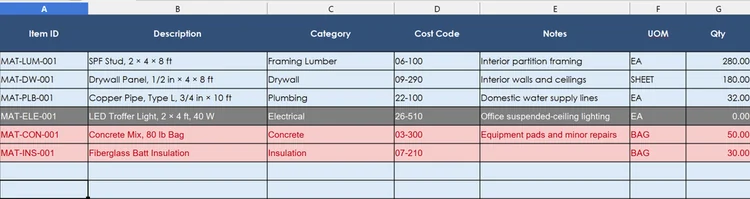


The construction materials workbook combines the original takeoff with approved changes to calculate current required quantities. It displays those requirements alongside received, used, and available quantities, as well as budgeted, actual, and projected costs. Potential shortages, overages, and other discrepancies are automatically highlighted for review.
This workbook is designed for trade contractors working on commercial construction projects who need to keep track of materials and costs - from takeoff to project completion. Use it when you already have a material takeoff but need a controlled way to track what changes during the project and compare the updated requirements with the actual inventory deliveries and usage.
Use this construction material requirements and inventory reconciliation template as a standalone tool, or connect it to QR Inventory software to capture material receiving, transfers, and usage in real time. With QR Inventory, project teams can track materials for each job in the field and warehouse, using field-optimized mobile app with bulk QR code scanning and natural language voice interaction. Mobile inventory updates are instantly synced to the centralized cloud system, giving field teams, warehouse staff, and managers real-time inventory visibility. Use Excel Power Query to automatically connect live inventory data to project materials workbook, or manually import data from QR Inventory with a few clicks.
The workbook remains project materials planning and reconciliation layer, while QR Inventory provides the operational inventory data. When inventory data are imported into the workbook, the current materials list and project summary recalculate automatically, helping you identify shortages, overages, unusual usage, and cost deviations.
